Chroma
Led the architecture of Vimeo's company-wide marketing design system, keeping Figma, Storybook, and the CMS in sync and building a TDD-first foundation that other engineers could build on.
- Company
- Vimeo, 2025/2026
- Role
- Software Engineer III
- Team
- 2 eng at launch, grew to 6 · 2 designers
- Timeline
- ~4 months to initial release
- Focus
- UI, UX, Design System, Component Architecture
Problem
Vimeo’s marketing site had no unified component system. Design worked in Figma, engineering worked in code, and the CMS had its own set of components, with nothing guaranteeing the three matched. The result was UI inconsistency, slower development, and no shared testing baseline for the components every marketing page depended on.
Approach
Aligning on architecture before writing code. Before any implementation, I wrote a proposal comparing two structures: a colocated “capsule” approach, where each component owns its parts and variants in its own folder, and an atomic approach organized into atoms, molecules, and organisms. I presented both to the team to surface current pain points rather than push a single answer. We chose a mostly atomic structure because it mirrored how our designers organized components in Figma, which made parity between design and code far easier to maintain. From the capsule approach, we kept one idea: an optional parts/ folder for pieces of a component that didn’t warrant becoming an atom of their own.
Button/├── Button.tsx├── Button.stories.tsx├── parts/│ └── ButtonIcon.tsx└── variants/ └── PrimaryButton.tsxchroma/├── atoms/│ ├── Button/│ └── Icon/├── molecules/│ └── SearchField/└── organisms/ └── Header/chroma/├── atoms/│ └── Button/│ ├── Button.tsx│ └── Button.stories.tsx├── molecules/│ └── SearchField/│ ├── SearchField.tsx│ └── SearchField.stories.tsx└── organisms/ └── Header/ ├── Header.tsx ├── Header.stories.tsx └── parts/ └── HeaderLogoLockup.tsxOne source of truth across three tools
I worked in lockstep with Design to keep Figma specs, Storybook documentation, and Builder.io CMS components in parity, and overhauled our Storybook setup so it reflected exactly what designers specified and what marketers could use. I championed a test-driven approach, writing component tests directly in Storybook stories and running them with Storybook’s built-in test runner. That made the documentation and the test suite the same artifact: every documented state was also a tested one, so the two could never drift apart.
Decisions that keep a system healthy
Some of the most important work was deciding what not to do. As a team, we discussed whether to use barrel exports, since they make import paths much cleaner. Because Chroma lived in a monorepo, though, we decided against them over concerns about circular dependencies and bundle size, and relied on monorepo path aliases instead to keep imports readable. We added an ESLint rule to catch barrel exports early, so the decision would hold as more contributors joined.
export * from './Button/Button'export * from './Icon/Icon'export * from './Link/Link'import { Icon } from '..' // resolves to atoms/index.ts, which re-exports Button itself{ "compilerOptions": { "paths": { "@chroma/*": ["packages/chroma/src/*"] } }}Bringing AI into the workflow
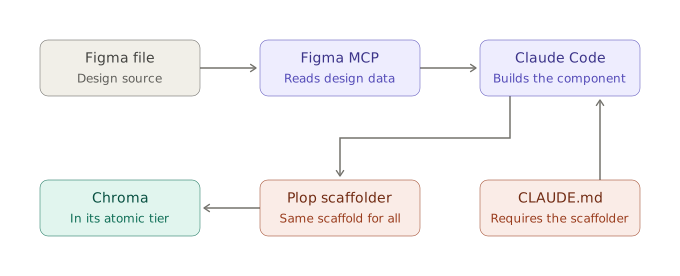
Later, I integrated the Figma MCP server so components could be scaffolded directly from design files, tightening design-engineering parity further. I also authored Claude Code rules files that encoded our coding standards, so AI-assisted contributions followed the same conventions as everything else in the system.
Governance built into creation
As more people, and more agents, contributed to Chroma, consistency couldn’t depend on everyone remembering the conventions. I set up a Plop.js generator that scaffolded every new component the same way: placing it in the right atomic tier, creating its Storybook stories file, and generating the registration file that made it available in the CMS. To make sure AI contributions followed the same path, our CLAUDE.md rules file required agents to use the scaffolder rather than creating files by hand. Whether an engineer or an agent started a component, it was correct from the first commit, which kept code review focused on the component itself instead of catching drift.
Outcome
Chroma became the foundation of Vimeo’s marketing site, growing to around 50 components across atoms, molecules, and organisms. Each one was documented and tested in the same Storybook story and registered for marketers to use directly in the CMS. After the initial implementation, I onboarded four additional engineers onto the system and served as their technical point of contact. Because of the scaffolder, every new component, whether an engineer or an agent started it, landed with the same structure, tests, and CMS registration from the first commit. The redesigned global navigation was one of the first major components built on it, and my partnership with Design on Chroma, along with onboarding other engineers onto it, earned a company-wide quarterly award for cross-functional collaboration.